
Log Spector
A modern, privacy-focused log beautifier with advanced syntax highlighting for all major programming languages and logging frameworks.
Overview
While debugging applications across different stacks, I found myself constantly having to copy the logs out of whichever app I was using into my code editor to try and get some legible output. Reading raw logs became tedious, especially when dealing with stack traces, nested JSON, or multi-line log entries.
Log Spector was built to solve this problem. It's a client-side web application that automatically detects log formats and applies beautiful syntax highlighting, making logs readable at a glance.
The Problem
I am spending significant time reading logs, but raw log output is often hard to parse:
- Different log formats require different parsing approaches
- Stack traces and error messages blend into the noise
- JSON logs are hard to read when minified
- No consistent way to filter or highlight important information
- Most log viewers require server-side processing or installation
I'd have to hope the client comes with some build in log prettification like headlamp or i'd have to squint my eyes and hope for the best. Since I am all about reducing cognitive load I needed a solution
The Solution
Log Spector runs entirely in the browser, providing instant log beautification without any server communication. It automatically detects log formats (Python logging, JavaScript winston/pino, JSON, syslog, etc.) and applies appropriate syntax highlighting, making logs readable and searchable.
The application is built with privacy in mind - all processing happens client-side, so sensitive logs never leave your device.
Key Features
- Smart Format Detection: Automatically detects Python (
logging,loguru,structlog), JavaScript (winston,pino,bunyan), JSON, and generic log formats - Beautiful Syntax Highlighting: Color-coded log levels, timestamps, modules, and stack traces
- 100% Client-Side: All processing happens in your browser, zero data transmission
- Dark & Light Modes: Easy on the eyes, day or night
- Advanced Filtering: Filter by log level, search text, hide/show components
- Privacy-First: Your logs never leave your browser - no server, no analytics, no tracking
- Blazing Fast: Instant parsing and rendering, even for large log files
- Responsive Design: Works beautifully on all screen sizes
Getting Started
Log Spector is available as a web application at: https://logspector.vhco.pro
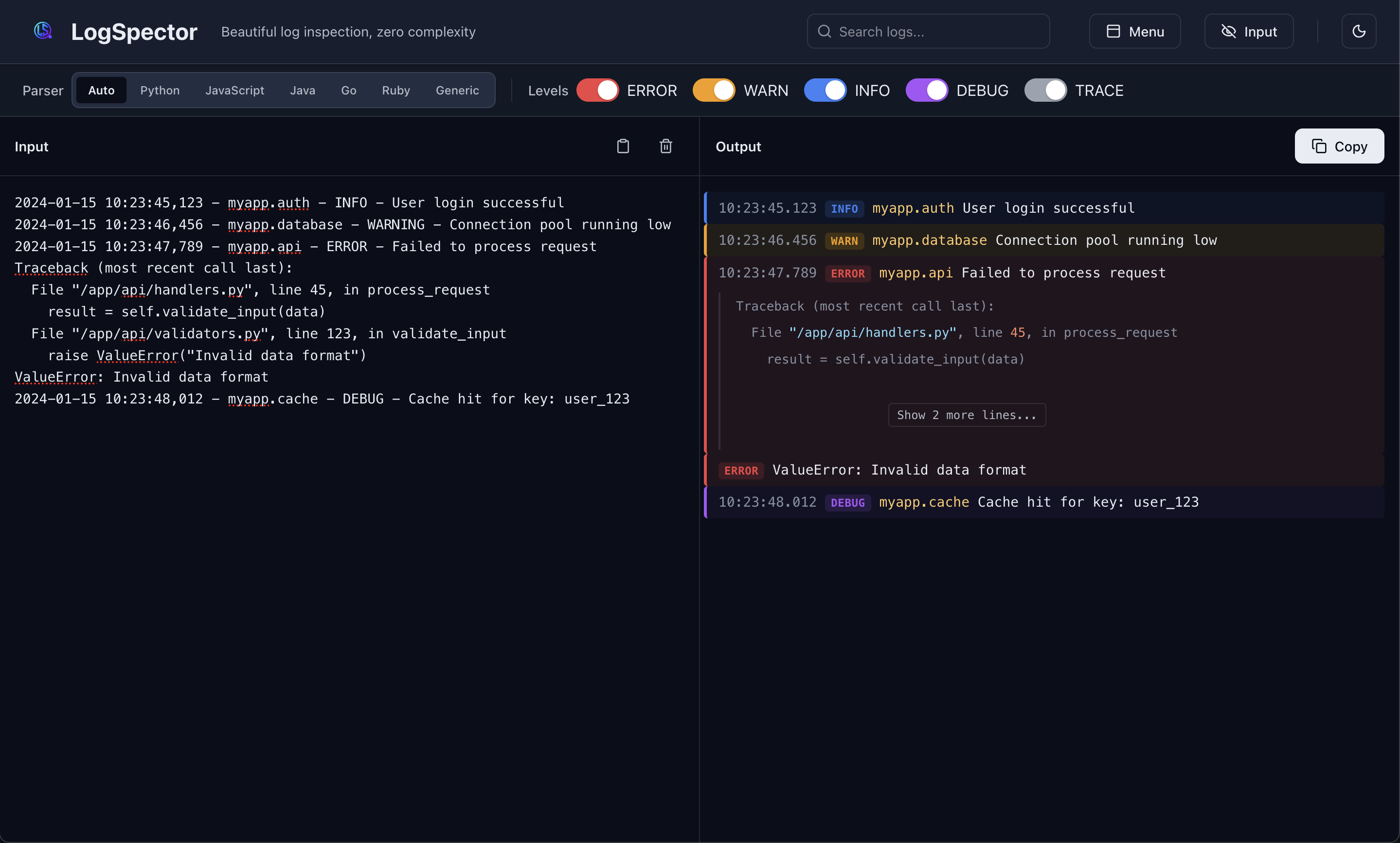
Simply open it in your browser and paste your logs.
Usage
- Open the application in your browser
- Paste your logs into the Input panel
- See beautifully formatted logs in the Output panel
- Use filters to focus on specific log levels or search for text
- Click Copy to copy formatted logs to clipboard
Supported Log Formats
Python
logging(standard library)logurustructlog
JavaScript/Node.js
winstonpinobunyanconsolelogs
Other
- JSON logs (any format)
- Generic text logs with timestamps
- Syslog format
Why It Matters
Reading logs is a core part of debugging and troubleshooting. When logs are hard to read, debugging takes longer, errors are missed, and developer productivity suffers.
Log Spector reduces cognitive load by automatically formatting logs, making it easier to spot errors, understand execution flow, and filter noise. The client-side approach ensures privacy and works in any environment, from local development to production debugging.